When something isn't included in your plan
Your plan decides a few things: which tools are included, how much the file library holds, how many tasks you can run in a month, how many people can use SuaveDocs. The Free plan includes every tool; some plans and licenses leave a few out (see Plans, quotas and trials). When a tool isn't included, its card on the Tools page says "Not included in your plan." and its page says so above the place you drop files, for example "OCR (make searchable) isn't included in your Basic for teams plan." followed by what to do: "Ask for more to use it." if you can ask for a change, "Ask a workspace owner for more." (a workspace owner is the person who manages your organisation's SuaveDocs online) if you can't, or "Ask your administrator to upgrade." on a SuaveDocs server your organisation runs itself. Ask for more opens the Plans and trials page in a new tab, when there is one; an administrator of a server your organisation runs itself gets Open License settings instead.
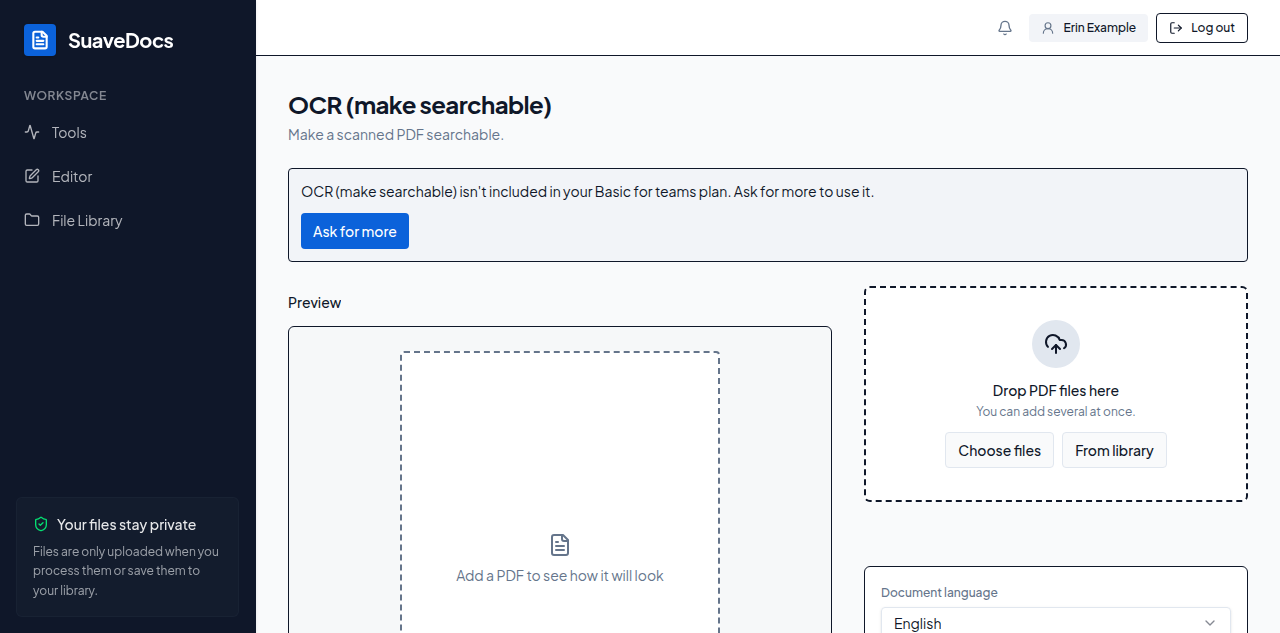 Figure: a tool that isn't included in the plan.
Nothing is switched off: you can still try. If SuaveDocs turns a task down, it says why in one sentence that ends with what to do, with at most one button: Ask for more, Open License settings (for the administrator of a server your organisation runs itself), or Try again once a short wait is over. Quotas, trials and what to do when you reach a limit are in Plans, quotas and trials.
On a SuaveDocs server your organisation runs itself, Community edition (SuaveDocs on your own server without a license) includes every tool; the administrator's License page says what a license adds (see License).