For administrators
Administration is where an administrator looks after SuaveDocs for your organisation: who has an account and who else is an administrator, everything people have done, how long that record is kept, the workspace letterhead, the letter templates people propose for everyone, the connections to Google Drive and OneDrive, and — on a server your organisation runs itself — your SuaveDocs license.
Before you start
You need to be an administrator — membership of the engine's admin group. If you are, an Administration link appears in your account menu; nobody else sees it.
Reaching the admin area
To open Administration:
- Select the account menu in the top right.
- Select Administration.
There are three things you might see instead of the page itself, depending on whether your access could be checked:
- Still checking: "Checking your access…" — wait; this is not a denial.
- You're not an administrator: you're sent straight back to the workspace, without a message.
- Your access couldn't be checked: you stay on the page, with a banner: "Your permissions could not be checked." / "SuaveDocs couldn’t load your permissions, so the admin area can’t be opened right now. Try again shortly." This is not the same as being denied — it means the check itself failed, so try again shortly rather than assuming you've lost access.
What you'll see when it's done: the "Administration" heading, with the subtitle "Everything you need to look after SuaveDocs for your organisation.", and one card for each part you have the right to open:
| Card | What it's for | Number on the card |
|---|---|---|
| People | Add people, reset passwords and choose who else is an administrator. | Everyone with an account, for example "24 people" or "1 person". |
| Members | Invite people, choose their role and remove people who have left. | — |
| Proposals | Letter templates people would like everyone in the workspace to use. | How many are waiting for an answer, for example "3 waiting", or "Nothing waiting". |
| Letterhead | The header printed on letters that use the workspace letterhead. | — |
| Signing | Your organisation's signing certificate and timestamp server. | — |
| Audit log | Everything people have done in SuaveDocs, searchable. | How many things have happened since midnight, for example "today: 41" ("today: 10,000+" past ten thousand). |
| Settings | How long the audit log is kept; on SuaveDocs cloud, also your workspace's name and web address. | — |
| Integrations | Let everyone open and save files in Google Drive and OneDrive. | — |
| License | Your SuaveDocs license, or what Community edition includes. | — |
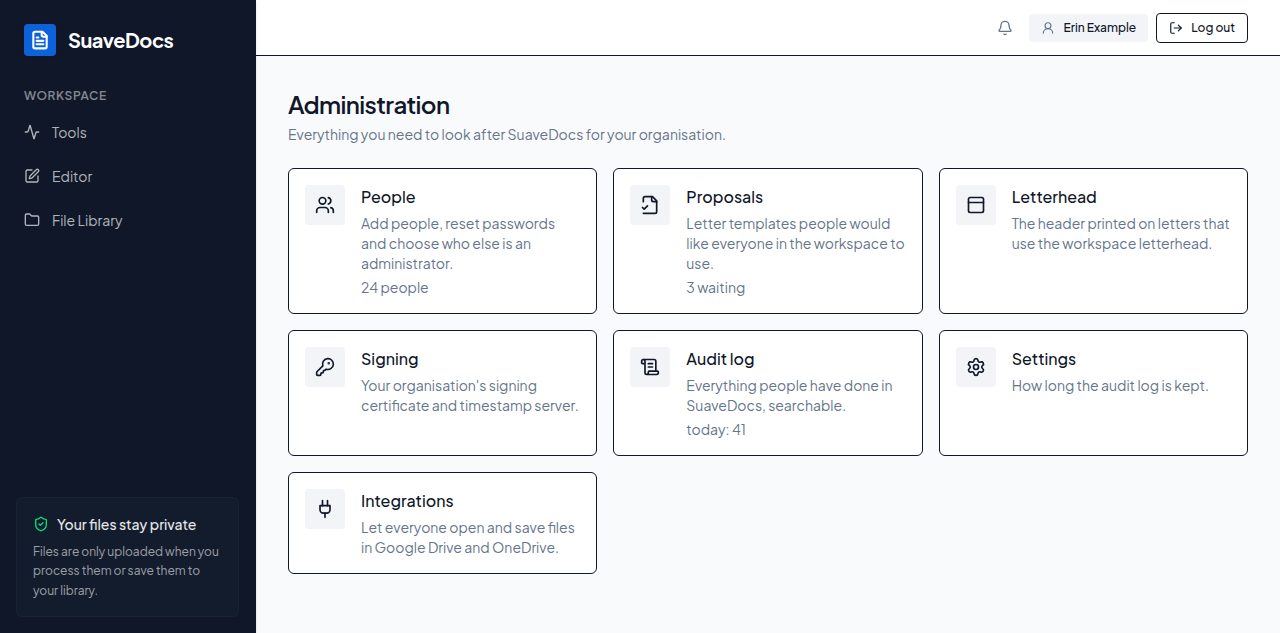 Figure: the Administration page, one card per section.
The License card appears only on a SuaveDocs server your organisation runs itself.
Select a card to open that part on its own page. Each one has Back to Administration at the top, which takes you back to the cards. A card whose number SuaveDocs couldn't work out just now shows no number; the card still opens. If you can open Administration but none of its parts are available to you, you'll see: "You can open the admin area, but none of its sections are available to you."
Older links to the admin area — a bookmark, or a notification from before Administration had cards — still work: they open the matching part.
Tips
- The admin area's three states — checking, denied, and "couldn't be checked" — look different on purpose: a banner saying your permissions couldn't be checked means try again, not that you've lost access.
- A card without a number is not an error: SuaveDocs couldn't work the number out just then, and the card still opens.
- Bookmark the People views you use often — Never signed in, Not in the last 90 days — the address keeps the filters.
- You can't deactivate, delete, or change the administrator status of your own account from this screen — do that from another administrator's session.
- Set a password directly when a person can't receive email; copy the one-time link when they can get it another way (chat, in person) faster than email would arrive.
- A delete refused because someone "still has documents" is not a dead end: SuaveDocs then asks what to do with them, and you can keep them in the Archive or move them to someone else first (see Delete a person in People).
- Read the whole of Everything this letter can say before approving a proposal — a "Shown only if …" part never appears in the preview's sample letter.
- The audit log's Action filter includes administrative events (people and settings changes) that your own Your activity page never shows.