License
On a SuaveDocs server your organisation runs itself, License shows your SuaveDocs license, or — without one — what Community edition includes. In a cloud workspace there is no License card.
To open it: open Administration and select the License card ("Your SuaveDocs license, or what Community edition includes.").
What Community edition includes
Without a license, SuaveDocs runs as Community edition. Under Included: "Every tool", "Up to 5 people (<n> now)" and "Audit log kept up to 30 days". Under Needs a license (only what your server is missing): "Google Drive and OneDrive", "API keys", "Single sign-on" and "Faster processing". If limits aren't switched on for your server yet, the page says "Limits aren't being applied on this server yet." — you can add a license before they are. If the audit log will soon be shortened, a line says from when, for example "From 19 November, audit events older than 30 days will be deleted."
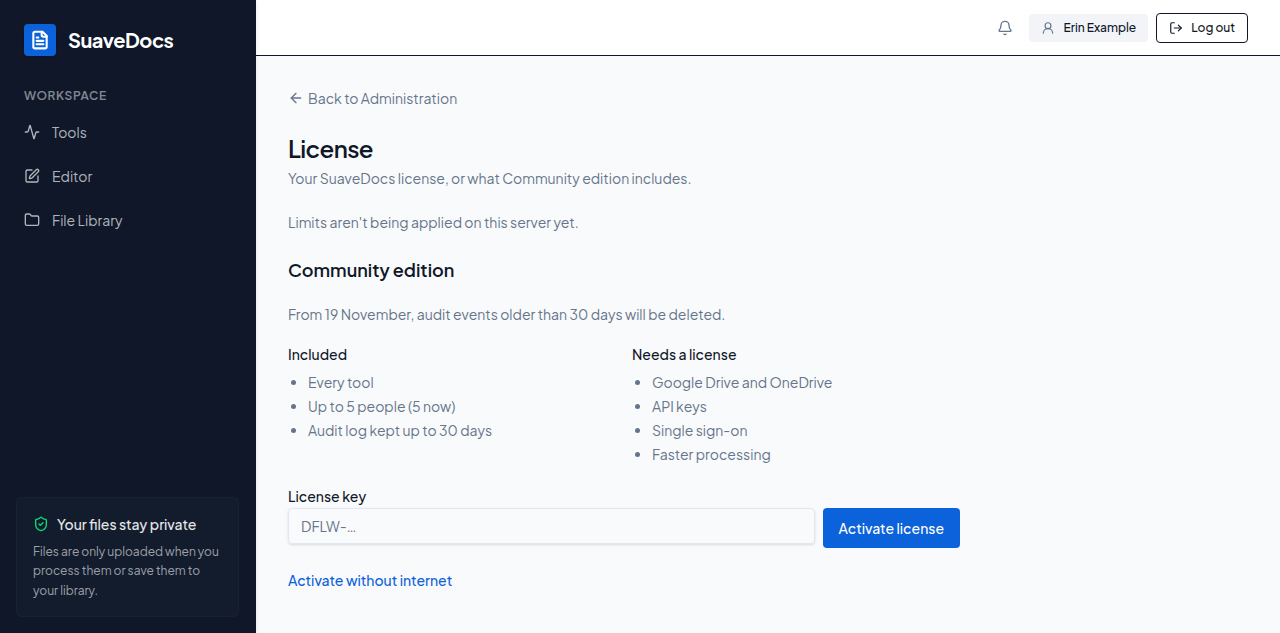 Figure: License without a license — Community edition.
Activate a license key
- Type the key you received from Xelvian into License key (it starts with "DFLW-").
- Select Activate license.
What you'll see when it's done: "License activated. SuaveDocs now allows 25 people." (the number your license allows, or "any number of people"), with the license shown below it.
Activate without internet
For a server that can't reach the internet:
- Select Activate without internet.
- "Copy this request code." — select Copy code ("Code copied.").
- "On a computer with internet, open the Xelvian license portal, paste the code there and download the license file." The portal's address is the one Xelvian gave you with your key.
- "Paste the license file's contents here, or choose the file." — paste it, or select Choose file, then select Activate license.
What you'll see when it's done: the same "License activated. …" line.
- "Type your license key." or "Paste the license file, or choose it." — the box was empty.
- "That doesn't look like a SuaveDocs license key. Check it and try again." / "That isn't a SuaveDocs license file. Paste all of it, or choose the file again."
- "That file couldn't be read. Choose it again, or open it in a text editor and paste its contents here." / "That file is too large to be a SuaveDocs license file. Choose the file Xelvian sent you, or paste its contents instead."
- "We couldn't find that key. Check it and try again." — check the key against the one Xelvian sent.
- "This key is already in use on another server. Remove it there in the license portal, or ask Xelvian for another key."
- "This key has ended. Contact Xelvian to renew it."
- "SuaveDocs couldn't reach the license server. Check this server's internet access, or use offline activation."
- "The license couldn't be activated. Try again in a moment." — nothing more specific was available.
Check the license
With a license, the page shows its name (for example Server Team), "Customer: <name>", "Key: DFLW-7K3MQ…", "Valid until <date>" (or "Never expires"), "Last checked <time>" (or "Not checked yet") and "People: 7 of 25". SuaveDocs checks the license by itself every day; select Check now to check straight away. A problem with the license or the last check shows as a warning line under its name.
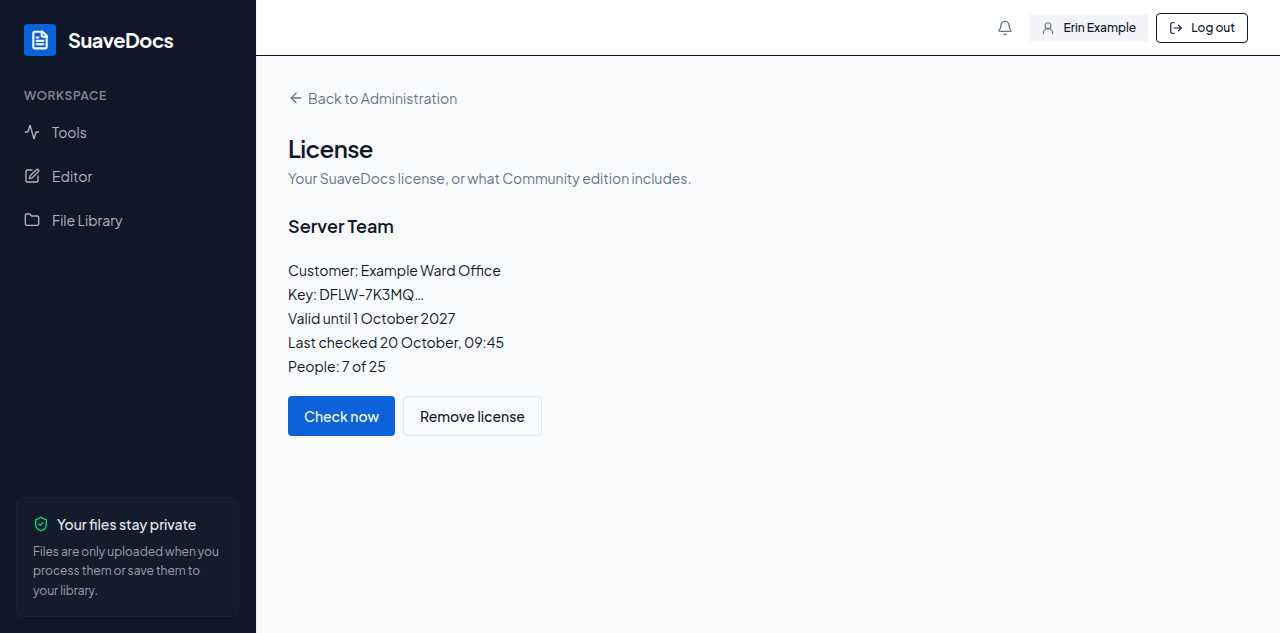 Figure: License with a license.
Remove the license
- Select Remove license.
- Confirm: "Remove this license?" / "SuaveDocs returns to Community edition: at most 5 people, no Google Drive or OneDrive, audit log up to 30 days. Everyone who has access keeps it." — Remove license, or Keep license to back out.
What you'll see when it's done: "License removed. SuaveDocs is running as Community edition."
When a license ends
When the license's end date passes, everything keeps working for a grace period, normally 30 days. Every page shows administrators: "Your SuaveDocs license ended on <date>. Everything keeps working until <date>; renew it to avoid returning to Community edition." with Open License settings, and the License page reads "Grace until <date>". If Xelvian extends the grace period, the banner says "Your SuaveDocs license ended on <date>. Xelvian has extended your grace period until <date>; renew it before then to avoid returning to Community edition." and the page "Grace extended by Xelvian until <date>". After the grace period SuaveDocs runs as Community edition, and the page starts with "Your license ended on <date>, so SuaveDocs is running as Community edition." Nobody who has access loses it.